


What is Streaming Server
Streaming server is for delivering media files like audio, video, and games to user devices. Streaming server is an alternative to downloading an entire audio or video file, which may take a long time, depending on the size of the file and speed of the internet connection. Instead, streaming continuously downloads and plays a small part of a file — just enough to create a seamless experience for the user — and doesn't save it to the user's device. As a result, users can access media more quickly and not tie up storage on their devices with enormous media files.
Advantages of Streaming Server
Increased Reliability
Streaming server provide a stable and controlled environment for streaming operations. Unlike shared hosting solutions, dedicated servers are not affected by traffic or resource usage of other clients, leading to higher uptime and consistent service availability. This reliability is crucial during high-stakes live broadcasts, where even a minor disruption can lead to significant viewer drop-offs.
Enhanced Performance
The exclusive allocation of resources on streaming server ensures that broadcasters can leverage the full potential of hardware capabilities. This results in higher video quality and smoother streaming experiences, even under the load of simultaneous access by large numbers of users. Enhanced performance is particularly noticeable when broadcasting high-definition content, which demands substantial computational power and bandwidth.
Scalability
Flexibility in scaling operations is another critical advantage offered by streaming server. As the audience size grows or the demand for higher quality streams increases, streaming server allow for quick resource upgrades or modifications without significant downtime. This scalability ensures that broadcasters can adapt to varying load demands efficiently.
Minimal RAM Usage
Streaming server optimizes RAM usage by preventing excessive memory consumption by boosting performance. The lesser the RAM usage, the smoother the operation and better resource allocation, enhancing overall server reliability. By conserving RAM resources, streaming servers can handle concurrent streaming requests more effectively, providing a seamless viewing experience for users.
-
![Multimedia Streaming Server]() Multimedia Streaming ServerCompact IP protocol exchange streaming server . Model#: DMB-8900AD. Highlight:. 1: Compact/1U Streaming Server for change the IP protocol, no changes on bitrate,resolution.. 2: HLS/ RTSP/ RTMP/read more
Multimedia Streaming ServerCompact IP protocol exchange streaming server . Model#: DMB-8900AD. Highlight:. 1: Compact/1U Streaming Server for change the IP protocol, no changes on bitrate,resolution.. 2: HLS/ RTSP/ RTMP/read more -
![IPTV Stream Server]() IPTV Stream ServerDigicast Complete All-In-One Hospitality Iptv Solution. HIGHLIGHTS. Deliver satellite live TV to guest rooms and common areas. Promote facility use with live video, provide orientation andread more
IPTV Stream ServerDigicast Complete All-In-One Hospitality Iptv Solution. HIGHLIGHTS. Deliver satellite live TV to guest rooms and common areas. Promote facility use with live video, provide orientation andread more


Our Factory
Hangzhou Dtvane Technology Co., Ltd. is located in China National High-Tech Development Zone, focusing on digital TV and network video system product development and sales, especially in high-quality video compression processing and channel transmission technology to maintain a leading edge, which is the domestic first-class of professional video operating system products and technical service providers.
Product Application
DVB-S/S2/S2X/ATSC/DVB-C/DVB-T/ISDB-T DIGITAL Cable TV Broadcasting SYSTEM
Video/Audio play online Any Screen Anywhere Any time (CCTV/ UAV/ Conference/ Speech/ Church/ School/ Wedding and so on)
Analog TV System upgrade to HD Digital TV System
Various IPTV OTT Application (Community/ Hospitality /Community/Hospital/Resort and so on)
FTTH/CATV/HDTV Fiber Transmission Solution including but not limited to above, DIGICAST Provide devices and solution for all applications that involve to video/audio convert, transport and distribute.
R&D
All equipments in our product portfolio are fully self-developed in our laboratories. With technology development and upgrading, it drives us to innovate constantly, via continuous researches and investments, our R&D team consists of high-qualified engineers and technicians, who work hard to design, develop new devices and improve current technology.
Our service
1: Original Factory Directly Price, Ready to Ship
2: Quality Guarantee, no worries on Products, expand your market rapidly
3: After-Sales : Remote Access for Technical Support 24*7 Lifetime
4: Professional R&D Team for various OEM/ODM services
What Are the Challenges of Streaming Server
Buffering is the practice of loading several seconds of streaming media ahead of time so that the file can keep playing smoothly even when network connections are interrupted or when connection speeds vary. Buffering impacts streaming quality when a user's device can't download content fast enough to maintain enough of a buffer to provide a smooth, seamless viewing experience. Bottlenecks, slow connections, and network congestion are some of the most common causes of buffering.
Latency is a delay in the delivery of a media file. Latency may be caused by the distance between the streaming media server and the user's device — the greater the distance, the more time it takes for the file to travel. Latency can also be affected by the load on a streaming media server. For example, when a media service experiences a spike in demand — like when a new, highly popular movie is released — its streaming media servers may not be able to deliver content quickly enough to users, causing latency.
Congestion on the network happens when the demand for data exceeds the capacity or bandwidth of the network to deliver it. As more people connect to a network and traffic load increases, network data speeds can slow down and make it harder for streaming media servers to deliver data fast enough.
Lack of redundancy can lead to issues with streaming media. Using multiple streams allows streaming media services to route content over the fastest stream and to bypass any issues or congestion. When streaming services can't offer redundant streams, any hiccup in transmitting data is more likely to impact viewing quality.
How to Build a Video Streaming Server
Setting up your own video streaming server will require a lot of technical know-how so make sure you partner up with a competent developer. We'll break down the general process into 5 steps:
There's no reason to reinvent the wheel. Thanks to open-source ideology, good-natured geeks around the world publish code that you can use as your base. If you work with Linux or BSD operating systems, you can take a look at this article that uses the popular Nginx web server. Otherwise, you can browse these open-source video streaming projects.
Your server is ready to roll. Now let's set up your streaming software. To stay within the open-source realm, you can use the popular OBS (Open Broadcast Studio). Choose your operating system to download the correct version and run the wizard to configure the platform to your needs. When you're done configuring, click ‘Start Streaming' to send your stream to your server.
A CDN will improve the viewer's experience by harnessing a network of proxy servers that will reduce the physical distance between the source and the user and ensure faster loading times for your content. To set up your CDN, you will need an origin server, points of presence (PoP), ISP, routing, and caching software.
Watch and monitor your stream with an open-source media player that supports RTMP, like VLC. Connect to your stream by clicking ‘Open Network Stream' under'Media' and entering the stream key.
Your basic streaming solution is set up. But you might want to build it out with proper security features, monetization, and Adaptive Bitrate technology (ABR), etc.
There you go. This is, in a nutshell, how to set up your own video streaming server, from your organization's connection. However, this will require a lot of bandwidth with high upload speeds. You'll also need transcoding, ABR technology, low-failure equipment, high-end security, uninterruptible power supplies, etc.
How Does Streaming Server Work
Before you start streaming your video content to your audience, you should know how it works, and learn it is not rocket science. A streaming server always needs the media or the video files it can deliver to the player. The process requires a server, the media, and the player; all three make video streaming possible on a user's device.
When viewers want to stream a media, they go to the Online video platform and click the file to access it. This action carries a request to the video storage server, where the server fulfills the request, and the viewer can stream it on their device.
Many steps occur in between, such as sending the right format, right resolution, breaking down the file into several small pieces, etc. This entire process takes place so fast and smoothly that it's not noticeable to viewers.
Many video streaming platforms also use a powerful CDN that makes delivering the media file even faster and smoother without any buffering.

Things to Consider When Using a Streaming Server
Technical Understanding
Setting up a server can be overwhelming if you're new to streaming. Although there are helpful resources available, it can still be challenging without some technical knowledge.
The reason is you need to make sure that your stream runs smoothly every time you go live.
Adding to that, if you lack technical expertise, it's easy to end up buying overkill specs, making it less cost-effective. So, if you're unsure, opting for a service that provides a great streaming server can be the best choice, offering reliable results without the complexities.
Time and Effort
Even if you know how to set up and maintain your streaming server, do you really have the time and energy for it? Wouldn't it be better to focus on coming up with awesome ideas and creating content for your audience?
With that in mind, might want to consider skipping the server setup hassle and go for an easier option.
At the end of the day, it's all about finding what works best for you and saves you some precious time and effort.
Cost
We understand that going with a dedicated server streaming service is convenient. But, it usually comes with a higher price tag compared to building your own setup.
If you decide to take this route, do research for the different pricing models offered by the services you're interested in. They might all claim to be affordable, but make sure they actually fit your streaming needs.
Latency
In the world of streaming, latency remains a challenge. So you need to think about it when kickstarting your streaming journey.
Latency refers to the delay between capturing a frame and displaying it to viewers. Having low latency is important for real-time interactions. Without it, online gaming and interactive broadcasts wouldn't be as enjoyable.
Scalability
You don't want your live stream channel to hit a roadblock, right? That's why it's crucial to set up your streaming server in a way that can adapt to future changes right from the start.
Your server needs to be ready for potential growth. If your viewership skyrockets and your server can't keep, your viewers will experience buffering. And, that is not a pleasing experience.
Security
When you're streaming online, security is a top priority for both you as a streamer and your viewers.
As a streamer, you want to ensure your content is protected from unauthorized access. And for your viewers, it's essential to safeguard their data and privacy. This applies whether you're using your own server or streaming platforms.
To boost security on your streaming server, you can use firewalls and DDoS protection. Or else, if you choose a platform, look for one that offers stream encryption and digital rights management (DRM) features.
Advanced Features
Having advanced features for your stream is a bonus. Most setups and services offer great adaptive bitrate features. But, having DVR functionality to pause and rewind live streams can take your stream to the next level.
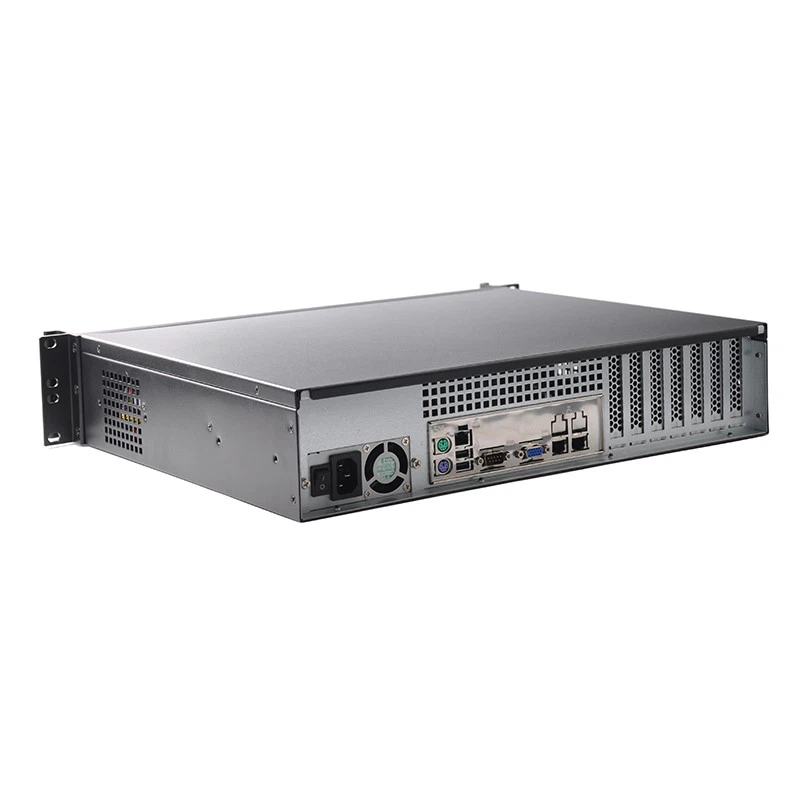
Securing a Streaming Server
Strong Authentication
Establish user authentication methods that are extremely robust and put them into effect. By employing multi-factor authentication, generally referred to as MFA, you can ensure that only authorized users can access your server.
Encryption
It is recommended that you encrypt your data to prevent snooping and attacks that include a man in the middle from actually being successful. It is possible to strengthen the level of security of the data connection that takes place between your server and the end users by adopting SSL/TLS protocols. This is something that can be done.
Regular Updates
Make sure that all of your software, including your application software, operating system software, and server software, is updated to the most recent version for optimal performance. In almost every instance, the most recent versions of software come along with security patches that offer protection against vulnerabilities that were found in earlier versions of the product.
Access Control
To restrict the number of people who can interact with your streaming server, you should implement access control restrictions. Access ought to be delegated solely to authorized users.
Network Security
Installation of intrusion detection systems and the utilization of firewalls to impose limits on both incoming and outgoing traffic are two measures that should be taken to monitor for possibly malicious conduct.
Content Security
Take into consideration the use of digital rights management (DRM) technologies to safeguard your video content from reproduction and distribution without your permission.
Logging and Monitoring
Establish all-encompassing logging and monitoring systems to keep track of the activities of users and swiftly identify any instances of questionable conduct.
Most Common Streaming Server Protocols
Also known as real-time streaming protocols (RTSPs), low-latency streaming protocols process high volumes of data with minimal delay and are consequently ideal for live events like sports or news broadcasts. On the other hand, adaptive streaming protocols like HTTP Live Streaming (HLS) adjust the quality of the stream based on the viewer's internet connection speed, providing a smoother content viewing experience.
Choosing the wrong protocol can result in a poor user experience and may end up costing a lot more. If you use a low latency protocol for on-demand content, for example, viewers may experience buffering or poor video quality if their internet connection isn't fast enough. If you use an adaptive streaming protocol for live events, however, viewers may experience a delay — and consequently a less engaging viewing experience. Last, different protocols have different technical requirements.
Real-Time Messaging Protocol (RTMP)
Originally developed by Macromedia (now Adobe), RTMP is a streaming protocol designed for real-time communication, including streaming audio, video and data over the internet. Commonly used to deliver live video content, RTMP breaks up video content into small chunks or packets and sends them in real time from a streaming server to a viewer's device.
Including mechanisms for error correction, retransmission of lost packets, custom metadata, and flow control, the streaming protocol ensures reliable and efficient data transmission. As a proprietary protocol, RTMP has certain technical limitations (lack of support across devices and platforms, special software requirements, etc.) and has been largely superseded by HTTP-based adaptive streaming protocols. But RTMP is still used for live streaming on gaming platforms like Twitch and for streaming to legacy devices that don't support newer protocols. Plus, Wowza's 2021 Video Streaming Latency Report found that nearly 80% of content distributors use RTMP for ingest.
Real-Time Streaming Protocol (RTSP)
Designed to control streaming media servers, the RTSP is a streaming protocol known for its extremely low latency. RTSP is an open standard protocol that allows clients to request video and audio streams from the server and control the playback of those streams.
Despite its flexibility and the ability to be used by anyone without license restrictions, RTSP is rather complicated and not as compatible, adaptable or scalable as other choices. Android and iOS devices are not immediately RTSP-compatible out of the box, but RTSP support remains ubiquitous in IP cameras, so the protocol is an industry standard across surveillance and closed-circuit television (CCTV) architectures.
Dynamic Adaptive Streaming over HTTP (DASH)
Also known as just DASH, Dynamic Adaptive Streaming over HTTP is another popular adaptive bitrate streaming protocol used to deliver audio and video content over the internet. DASH is an international standard for streaming media developed by the MPEG organization.
More or less a vendor-independent alternative to HLS, DASH works — much like HLS — by breaking down a media file into small, equally sized segments (generally two to 10 seconds long) and serving those segments as individual files over HTTP. First, a media file is encoded into multiple versions with different bitrates and resolutions. Then a manifest file is created listing all available versions. From there, each version of the media file is split into small, equally sized segments, saved and hosted on a web server that supports HTTP. When a client requests the manifest file from the server, it parses that file and selects the appropriate version of the media file based on the device's capabilities and network conditions. Finally, the client decodes and plays back the segments as they are received from the server, requesting lower bitrate versions in real time to streamline the viewer's experience. DASH enjoys the same CDN cost savings as HLS.
FAQ
As one of the most professional streaming server manufacturers and suppliers in China, we're featured by quality products and good service. Please rest assured to wholesale high-grade streaming server from our factory.
streaming server, IPTV Stream Server, Multimedia Streaming Server