


What is Transcoder
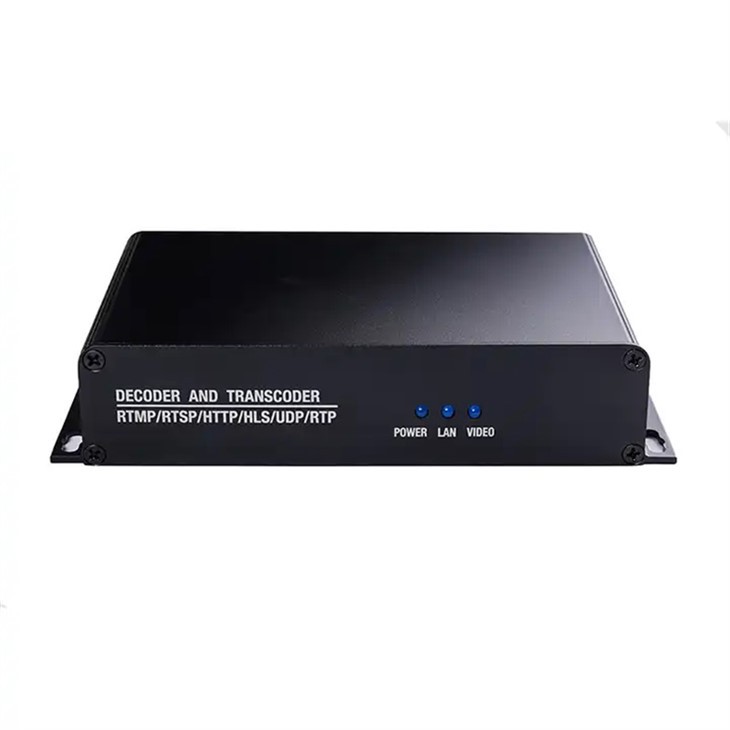
Transcoder is a professional high-definition audio and video transcoding product, which can realize single-channel IP streaming media conversion, supports up to 4k IP signal input, and supports 1 channel IP streaming media output. It involves decoding the original data into an intermediate format, the re-sizes and re-encodes the video to a new or several new formats.Transcoding is taking encoded (or “compressed”) video or other digital content, decompressing it, and altering and re-compressing it. For example, a high-resolution video shot on a digital camera (HD, 4K, etc.) can be transcoded into a lower-resolution format for editing; in other words, smaller files that are faster and easier to manipulate in editing software.
Advantages of Transcoder
Compatibility: Transcoder different devices and platforms have support for different resolutions, bitrates, codecs, and container formats. Transcoding enables seamless conversion into desired formats that are compatible with a wider range of devices and platforms.
Optimization: Transcoder allows videos to be optimized for different devices (desktops, smartphones, tablets, or smart tvs) which all have different definitions for ‘optimal' settings. By transcoder videos into resolutions and bitrates that ensure the smoothest playback for each at the best possible image quality, you ensure a better viewing experience for users.
File size reduction: Transcoder videos can also reduce the file size of the video, making it easier and quicker to upload, share, or stream. This is especially important when dealing with large videos.
Accessibility: Transcoder closed captions and subtitles can be added during the transcoding process, enabling users with hearing impairments to understand the content of the video. Videos can also be transcoded with audio streams in different languages, to cater to non-native speakers.
-
![Srt Transcoder]() Srt TranscoderDMB-8900AT-EC Classic is suitable for professional broadcast level IPTV&OTT system construction, hospitality IPTV application, Remote HD multi-window video conference, Remote HD education and Remoteread more
Srt TranscoderDMB-8900AT-EC Classic is suitable for professional broadcast level IPTV&OTT system construction, hospitality IPTV application, Remote HD multi-window video conference, Remote HD education and Remoteread more -
![Iptv Transcoder]() Iptv TranscoderDMB-8900AT-EC Classic is suitable for professional broadcast level IPTV&OTT system construction, hospitality IPTV application, Remote HD multi-window video conference, Remote HD education and Remoteread more
Iptv TranscoderDMB-8900AT-EC Classic is suitable for professional broadcast level IPTV&OTT system construction, hospitality IPTV application, Remote HD multi-window video conference, Remote HD education and Remoteread more -
![HD 8 Channel IPTV Transcoder]() HD 8 Channel IPTV TranscoderDMB-8900AT-EC Classic is suitable for professional broadcast level IPTV&OTT system construction, hospitality IPTV application, Remote HD multi-window video conference, Remote HD education and Remoteread more
HD 8 Channel IPTV TranscoderDMB-8900AT-EC Classic is suitable for professional broadcast level IPTV&OTT system construction, hospitality IPTV application, Remote HD multi-window video conference, Remote HD education and Remoteread more -
![Converter Multiplexer]() Converter MultiplexerDIGICAST HLS to ASI Converter/Multiplexer. Model #:DMB-9160A . Highlight. 1: Supports RTMP/HTTP/RTSP/HLS/SRT input( DATA 1 ) , UDP/RTP input( DATA 3 ). 2: Supports 1 gigabit output (DATA2) ,4 MPTS/read more
Converter MultiplexerDIGICAST HLS to ASI Converter/Multiplexer. Model #:DMB-9160A . Highlight. 1: Supports RTMP/HTTP/RTSP/HLS/SRT input( DATA 1 ) , UDP/RTP input( DATA 3 ). 2: Supports 1 gigabit output (DATA2) ,4 MPTS/read more -
![Best IP streaming Video Transcoder]() Best IP streaming Video TranscoderIP to IP Video Transcoder. Model: DMB-8900TB-EC. Highlights. 1. High-Performance Decoding + Transcoding in Compact Form Factor. 2. Supports multiple network streaming protocols. 3. HEVC, H.265, H.264read more
Best IP streaming Video TranscoderIP to IP Video Transcoder. Model: DMB-8900TB-EC. Highlights. 1. High-Performance Decoding + Transcoding in Compact Form Factor. 2. Supports multiple network streaming protocols. 3. HEVC, H.265, H.264read more


Our Factory
Hangzhou Dtvane Technology Co., Ltd. is located in China National High-Tech Development Zone, focusing on digital TV and network video system product development and sales, especially in high-quality video compression processing and channel transmission technology to maintain a leading edge, which is the domestic first-class of professional video operating system products and technical service providers.
Product Application
DVB-S/S2/S2X/ATSC/DVB-C/DVB-T/ISDB-T DIGITAL Cable TV Broadcasting SYSTEM
Video/Audio play online Any Screen Anywhere Any time (CCTV/ UAV/ Conference/ Speech/ Church/ School/ Wedding and so on)
Analog TV System upgrade to HD Digital TV System
Various IPTV OTT Application (Community/ Hospitality /Community/Hospital/Resort and so on)
FTTH/CATV/HDTV Fiber Transmission Solution including but not limited to above, DIGICAST Provide devices and solution for all applications that involve to video/audio convert, transport and distribute.
R&D
All equipments in our product portfolio are fully self-developed in our laboratories. With technology development and upgrading, it drives us to innovate constantly, via continuous researches and investments, our R&D team consists of high-qualified engineers and technicians, who work hard to design, develop new devices and improve current technology.
Our service
1: Original Factory Directly Price, Ready to Ship
2: Quality Guarantee, no worries on Products, expand your market rapidly
3: After-Sales : Remote Access for Technical Support 24*7 Lifetime
4: Professional R&D Team for various OEM/ODM services
Application of Video Transcoder
Video editing
When studios create videos for distribution, they use video transcoding throughout the editing process. First, editors transcode original files from a camera into a format that works with their editing software. Next, they edit the clips and transcode the final edited version into the desired delivery format. Transcoding also makes the editing process much easier because it can reduce the size of video files for a smooth editing experience.
Content distribution
Transcoding supports the distribution of video files to a range of platforms. Distributors transcode the master file into the specific distribution formats that they use, depending on the final streamlining location of the video. For example, different parts of the world use distinct video format standards. The United Kingdom uses the Phrase Altering Line (PAL), the United States uses the National Television System Committee (NTSC), and Saudi Arabia uses Sequential Color and Memory (SECAM).
Similarly, all streaming services, such as YouTube and Amazon Prime Video, have varying technical requirements for delivering video content to their audiences. Editors can transcode a version of the video that matches these specifications. A standard web-friendly video format is the H.264 codec.
Television broadcasting
Cable TV providers use transcoding to compress media files and transmit them to channel subscribers. This strategy minimizes bandwidth usage while maintaining a high level of quality.
Broadcasting networks transcode videos to deliver different file formats to terrestrial TV networks, satellite TV, and cable TV. Platforms and regions can have different broadcasting standards, and video transcoding ensures compatibility and compliance with these specifications.
Live streaming events
Live events like sports matches, webinars, concerts, and gaming rely on transcoding software to adapt the file format to different end devices. By adjusting the video file to a user's device, you can provide a high-quality viewing experience. When you package videos with web-friendly adaptive streaming formats, such as HTTP live streaming (HLS), you enable playback on practically any device.
Pay-per-view subscription services
Pay-per-view channels or subscription services use transcoding to deliver media to users who pay. Providers use digital rights management (DRM) to encrypt video content and protect against unauthorized viewers. When a user plays a video, the platform requests a license key from the server. The server determines if the user is authorized before it sends a decryption key and allows playback. These streaming services also use video transcoding to ensure that users receive a high-quality viewing experience, no matter which device they view from.
Online video meeting platforms
Online meeting platforms such as Amazon Chime transcode video from meeting attendees to display a high-quality video stream. These platforms use adaptive streaming to alter playback quality and format based on internet connection speeds and device type.
Codec Conversion: The heart of transcoding lies in changing the codec, the algorithm used to compress and decompress video data. Different codecs like H.264, H.265 (HEVC), VP9, and AV1 offer varying degrees of compression efficiency and quality. Transcoding might involve switching from a less efficient codec to a more modern one to reduce file size without compromising visual fidelity.
Resolution Adjustment: Video resolution, defined by the number of pixels, dictates the image's clarity. Common resolutions include 1080p (Full HD), 720p (HD), and 480p (SD). Transcoding can downscale a high-resolution video to suit devices with smaller screens or limited bandwidth, or upscale it for larger displays.

Bitrate Modification: Bitrate represents the amount of data used to represent each second of video. Higher bitrates yield superior quality but also larger files. Transcoding allows fine-tuning bitrate to strike a balance between quality and file size, crucial for smooth streaming over varying internet speeds.
Frame Rate Alteration: Frame rate signifies the number of images displayed per second, influencing the video's smoothness. Common frame rates include 24fps (cinematic), 30fps (standard), and 60fps (smoother). Transcoding can adjust the frame rate to optimize for specific devices or purposes.
Audio Format Conversion: Video files also contain audio tracks. Transcoding can involve changing the audio codec or adjusting parameters like bitrate and sample rate for compatibility and quality.
How Does Video Transcoder Differ From Encoder
Encoder
In encoder raw video is converted into a compressed, digital format.
The main goal of encoder is to compress raw video or audio content to make it easier to store and stream. It involves compressing large raw files (like those from a video camera) into a format that's more manageable and suitable for streaming or storing, like MP4 or MP3.
During encoder, the original file is compressed to reduce its size. This involves removing some data, ideally in a way that doesn't noticeably reduce quality. Encoder is typically the first step in preparing raw media content for broadcast, streaming, or storage.
Transcoder
In Transcoder, the video file is converted from one format to another.
The main purpose of transcoder is to make media files compatible with different devices and bandwidths. It's about changing the format to suit different needs, like playing on a smartphone versus a TV.
In transcoder, the file is first decoded (uncompressed), and then re-encoded into the new format. This process can also involve changing other properties of the file, like its resolution or bit rate.
Transcoder is used when there's a need to distribute the same content in different formats for different platforms or devices.
In simpler terms, think of encoder as translating a story from your thoughts into a written book, while transcoder is like taking that book and translating it into different languages for different readers. Encoder is about initial creation, and transcoder is about adapting to different needs after the fact.
Generally speaking, encoder refers to the process of converting uncompressed data to the desired format. This is understood to be a lossy process. On the other hand, video transcoder is the process of decoding a video file from one format to an uncompressed format and then encoder the uncompressed data to the desired format. Video transcoder is commonly used when the video file is being moved from a source to a different destination, and when the two support different file formats.
One of the most important uses of video transcoder is in uploading video from one source – a desktop, to an online video hosting site, so that the format is supported by the video hosting site.
Factors Influencing Transcoder Choices
The choice of transcoder type is influenced by a multitude of factors, each playing a significant role in determining the most suitable method. Firstly, the source and target formats are crucial considerations. Different formats have varying compatibility with devices and platforms, and the choice of transcoder must ensure the content can be viewed as intended. Secondly, the quality and resolution requirements play a significant role. High-definition content requires more processing power and bandwidth, influencing the choice of transcoder method. Thirdly, the speed and efficiency of the transcoder process are vital, especially in real-time streaming scenarios where delays can significantly impact the viewer experience. Lastly, cost implications cannot be overlooked. While hardware transcoder solutions may offer superior performance, they come with higher costs compared to software solutions. Therefore, the choice of transcoder type must strike a balance between performance, compatibility, cost, and the specific requirements of the use case.
Quality and Resolution
Quality and resolution are key factors that can dictate the choice of transcoder methods. High-definition content, such as 4K or 8K videos, requires more processing power and bandwidth for transcoder. This might necessitate the use of hardware transcoder solutions, which are typically more powerful and efficient than software solutions. On the other hand, content with lower resolution or quality requirements can be effectively handled by software transcoder tools. Furthermore, the target device or platform also influences the quality and resolution requirements. For instance, content intended for mobile devices may not require as high a resolution as content meant for large-screen displays. Therefore, understanding the quality and resolution requirements is crucial in choosing the most appropriate transcoder method.
File Format Considerations
The source and target file formats significantly impact the transcoder process. Different formats have varying levels of compatibility with devices and platforms, and the transcoder method must ensure the content can be viewed as intended. For instance, some formats are more suited for streaming over the internet, while others are better for local playback. Additionally, certain formats offer better compression efficiency, which can reduce bandwidth requirements and improve streaming performance. Therefore, understanding the characteristics and requirements of the source and target formats is essential in choosing the most suitable transcoder method.
Speed and Efficiency
Speed and efficiency are paramount in the transcoder process, especially in real-time streaming scenarios. Delays in transcoder can lead to buffering and lagging, significantly impacting the viewer experience. Therefore, the transcoder method must be capable of processing the content quickly and efficiently. Hardware transcoder solutions, while more expensive, typically offer superior performance and can handle high-definition content more effectively. On the other hand, software transcoder tools, while less powerful, are more flexible and can be easily scaled to handle larger volumes of content. Therefore, the choice between speed and efficiency, and scalability and flexibility, often influences the choice of transcoder method.
Cost Implications
The cost implications of different transcoder types are a significant consideration. Hardware transcoder solutions, while offering superior performance, come with higher costs. These solutions require specialized equipment and may also incur additional costs for maintenance and upgrades. On the other hand, software transcoder tools are typically more affordable and offer greater flexibility. They can be easily scaled to handle larger volumes of content, making them a cost-effective solution for many use cases. However, they may require more processing power and bandwidth, which can increase operational costs. Therefore, understanding the cost implications and balancing them against the performance requirements is crucial in choosing the most suitable transcoder method.
Notes On Transcoding Using a Transcoder
Transcoder is a time and hardware intensive process. If you have a lot of high-resolution footage to transcode, it can still take a long time, even if you have a powerful hardware setup at your disposal.
Most modern video editing software tries to mitigate this by allowing you to either transcode in the background —for example in FCPX, or in another app, such as Adobe Media Encoder — while you edit in the foreground. But you'll still see a performance hit, especially if you're asking your computer to do two things at once.
Ensure that all of your settings are correct before you set a batch transcoder of all your footage. If you don't intend to alter the frame rate or video resolution of your new clips, you need to make sure these are set correctly.
If you're planning on doing a lot of compositing, green-screen or visual effects work, you will want to choose a codec to transcode to that preserves as much image quality, bit depth, and color information as possible.
A final consideration when transcoder, especially if creating proxy files, is to test that the new proxies will re-link to the original camera files seamlessly. Sometimes if there are major differences between the two, such as a different number of audio channels in the proxies compared to the original camera media, this can cause issues.
Similarly it is important to know if you will lose any crucial metadata in the transcoder process that you might be relying on, such as the original timecode, color information or source camera settings.
FAQ
As one of the most professional transcoder manufacturers and suppliers in China, we're featured by quality products and good service. Please rest assured to wholesale high-grade transcoder from our factory.
vp9 conversion, digital conversion, batch transcoder