


In the dynamic landscape of digital media, the need for efficient transcoding has become more critical than ever. As a transcoder supplier, I understand the challenges that content providers, broadcasters, and streaming platforms face when it comes to speeding up the transcoding process. In this blog post, I will share some valuable insights and strategies that can help you optimize your transcoding workflows and achieve faster turnaround times.
Understanding the Transcoding Process
Before delving into the strategies for speeding up transcoding, it's essential to have a basic understanding of how the process works. Transcoding is the process of converting a digital media file from one format to another, typically to make it compatible with different devices, platforms, or bandwidth requirements. This involves decoding the original file, re - encoding it into the desired format, and then multiplexing the audio and video streams if necessary.
The transcoding process can be resource - intensive, especially when dealing with high - definition (HD) or ultra - high - definition (UHD) content. Factors such as video resolution, frame rate, bitrate, and codec can significantly impact the transcoding time. Therefore, optimizing these parameters is crucial for achieving faster transcoding speeds.
Optimize Input and Output Formats
One of the first steps in speeding up the transcoding process is to choose the right input and output formats. Some formats are more computationally expensive to transcode than others. For example, uncompressed formats like RAW video require a significant amount of processing power and time to transcode compared to compressed formats like H.264 or H.265.
When selecting the output format, consider the target devices and platforms. For mobile devices, formats like MP4 with H.264 codec are widely supported and offer a good balance between quality and file size. For streaming applications, Adaptive Bitrate Streaming (ABS) formats such as MPEG - DASH or Apple HLS are recommended as they allow for seamless playback across different network conditions.
Using a Converter Multiplexer can also streamline the transcoding process by combining multiple functions into a single device. This reduces the need for multiple hardware components and simplifies the workflow, ultimately leading to faster transcoding times.
Leverage Hardware Acceleration
Hardware acceleration is a powerful technique for speeding up the transcoding process. Instead of relying solely on the CPU for encoding and decoding, hardware accelerators such as Graphics Processing Units (GPUs) and Field - Programmable Gate Arrays (FPGAs) can offload the computationally intensive tasks.
GPUs are particularly effective for video transcoding as they are designed to handle parallel processing tasks. Modern GPUs have thousands of cores that can process multiple video frames simultaneously, significantly reducing the transcoding time. Many transcoding software solutions now support GPU acceleration, allowing you to take advantage of this technology.
FPGAs, on the other hand, offer even greater flexibility and performance. They can be programmed to perform specific encoding and decoding algorithms, making them highly efficient for transcoding tasks. FPGA - based transcoding solutions are often used in enterprise - level applications where high - volume and high - speed transcoding are required.
Implement Parallel Processing
Parallel processing is another effective way to speed up the transcoding process. Instead of transcoding one video file at a time, you can divide the workload into multiple smaller tasks and process them simultaneously. This can be achieved by using multi - core CPUs, GPUs, or distributed computing systems.
For example, if you have a multi - core CPU, you can configure your transcoding software to use all available cores for processing. This allows the software to work on multiple video frames or segments at the same time, reducing the overall transcoding time.
In a distributed computing environment, you can use multiple servers or computers to share the transcoding workload. Each server can be responsible for transcoding a portion of the video files, and the results can be combined at the end. This approach is particularly useful for large - scale transcoding projects where a single server may not have enough processing power.
Optimize Encoding Settings
The encoding settings you choose can have a significant impact on the transcoding time. When configuring the encoding parameters, it's important to find the right balance between quality and speed.
For example, reducing the video resolution and frame rate can significantly reduce the transcoding time without sacrificing too much quality. Similarly, adjusting the bitrate can also affect the transcoding speed. A lower bitrate generally results in faster transcoding, but it may also reduce the video quality.
Most transcoding software allows you to choose different encoding presets, such as "fast," "medium," or "slow." These presets are optimized for different levels of quality and speed. If you're looking for a quick turnaround time, choosing a faster preset can help you speed up the transcoding process.
Use a High - Performance Transcoder
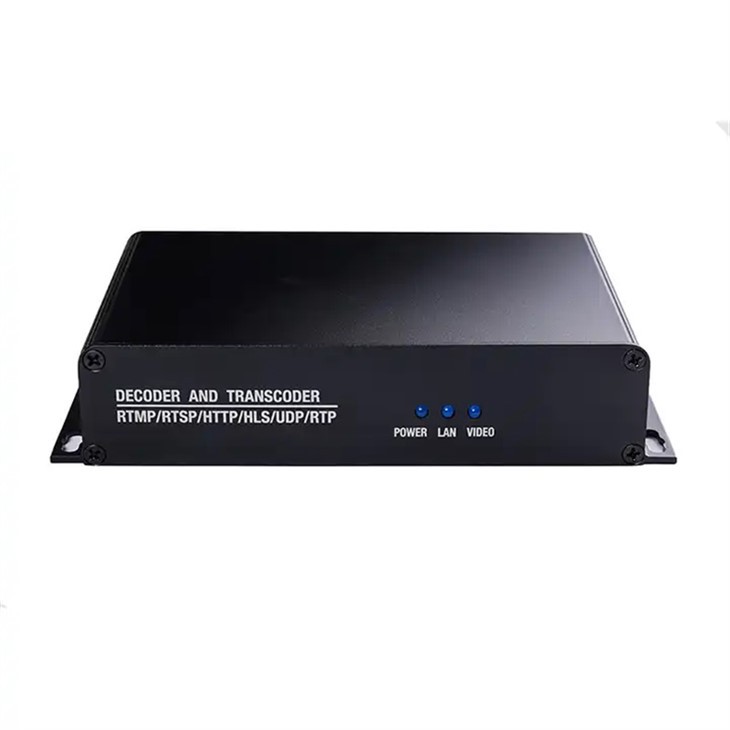
Investing in a high - performance transcoder is essential for achieving fast transcoding speeds. As a transcoder supplier, I recommend our Best IP streaming Video Transcoder, which is designed to deliver exceptional performance and reliability.
Our transcoder is equipped with the latest hardware technology, including powerful CPUs and GPUs, to ensure fast and efficient transcoding. It also supports a wide range of input and output formats, making it suitable for various applications. Additionally, our transcoder comes with advanced features such as real - time monitoring and error correction, which help to optimize the transcoding process and ensure high - quality output.
Conclusion
Speeding up the transcoding process is crucial for meeting the demands of the digital media industry. By optimizing input and output formats, leveraging hardware acceleration, implementing parallel processing, optimizing encoding settings, and using a high - performance transcoder, you can significantly reduce the transcoding time and improve your overall workflow efficiency.
If you're interested in learning more about our transcoding solutions or have any questions about how to speed up your transcoding process, please don't hesitate to contact us. We're here to help you find the best solutions for your specific needs and ensure that you can deliver high - quality content to your audience in a timely manner.

References
- Smith, J. (2020). Digital Video Transcoding: Principles and Practices. Publisher X.
- Johnson, A. (2019). Hardware Acceleration in Video Processing. Journal of Multimedia Technology, 15(2), 45 - 56.
- Brown, C. (2021). Optimizing Encoding Settings for Faster Transcoding. Proceedings of the International Conference on Digital Media.